
Robotium Support Various functions to test the Android Radio buttons functionality.
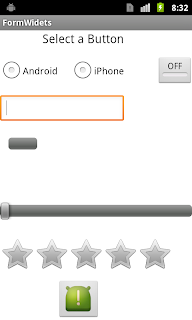 the following are the few APIs supported by Robotium,
 - getCurrentRadioButtons()
- clickOnRadioButton(int index)
- isRadioButtonChecked(int index)
- isRadioButtonChecked(String text)
Test case for Radio Buttons:
Steps :- Check the current status of Radio buttons
- Select the Radio button ‘Android’
- Select the Radio button ‘iPhone’
- Verify the Status of Radio buttons
1: public void testRadioButton() throws Exception {
2: solo.waitForActivity("MainActivity");
3:
4: //check if Android Button is selected?
5: actual = solo.isRadioButtonChecked(0);
6:
7: if(actual == false){
8: Log.d("Incube_FormWidget", "E1: Android Button is not selected");
9: }else{
10: Log.d("Incube_FormWidget", "E1: Android Button is selected");
11: }
12:
13: assertEquals("Android Button is checked",false, actual);
14:
15:
16: //check if iPhone Button is selected
17: actual = solo.isRadioButtonChecked(1);
18:
19: if(actual == false){
20: Log.d("Incube_FormWidget", "E2: iPhone Button is not selected");
21: }else{
22: Log.d("Incube_FormWidget", "E2: iPhone Button is selected");
23: }
24: assertEquals("iPhone Button is checked",false, actual);
25:
26: //select Radio Button Android
27: solo.clickOnRadioButton(0);
28:
29: actual = solo.isRadioButtonChecked("Android");
30: if(actual == true){
31: Log.d("Incube_FormWidget", "E3: Android Button is selected");
32: }else{
33: Log.d("Incube_FormWidget", "E3: Android Button is not selected");
34: }
35: assertEquals("Android Button not selected",true, actual);
36:
37: //select Radio Button iPhone
38: solo.clickOnRadioButton(1);
39:
40: actual = solo.isRadioButtonChecked("iPhone");
41: if(actual == true){
42: Log.d("Incube_FormWidget", "E4: iPhone Button is selected");
43: }else{
44: Log.d("Incube_FormWidget", "E4: iPhone Button is not selected");
45: }
46:
47: assertEquals("iPhone Button is not selected",true, actual);
48:
49: }
Explanation :
- Verify the status of Radio buttons : ‘solo.isRadioButtonChecked()’ is used to verify the status of radio buttons, which returns ‘true’ if the status is checked, otherwise return ‘false’
- argument can be index or a string
- Select the Radio button : ‘solo.clickOnRadioButton()’ is used to select the radio button of a given index
- in the above code we used, ‘Log.d()’, which is used to write the log to ‘Logcat’,
- first parameter passed to Log.d is the ‘Key’, which can be used to uniquely identify the logs in the Logcat.
- second parameter is the actual message, we are printing to Logcat
- there are other options like Log.i, Log.d etc.. which i will explain in the upcoming tutorials..
